Published February 7, 2025 • SimplTests Blog • Online Quiz Maker • Classroom Quizzes
Create Classroom Quizzes with AI and Export to Canvas in Minutes
Creating quizzes manually can take hours. We built SimplTests so teachers can create tests and classroom quizzes in minutes, use AI to generate questions, and export straight to tools like Canvas.
Why Use Canvas for Classroom Quizzes?
Canvas is one of the most widely used LMS platforms in K-12 and higher ed. It supports QTI (Question and Test Interoperability) packages—a standard format that SimplTests exports. Create quizzes with AI, export as a Canvas-ready QTI package, and import into your Canvas course. Graded quizzes, question banks, and assignments all in one flow.
1. Start a New Quiz in SimplTests
Click on Create Test in the header, which will take you to the quiz generator page. Enter the title, then click "Add new question". You can select the type of question and follow through from there.
2. Generate Questions Faster With AI
SimplTests includes an AI quiz generator so you can quickly draft strong multiple choice, true/false, and short-answer questions.
- Select the type of question (multiple choice, true/false, or short answer).
- Choose the number of questions you want to generate.
- Enter the topic or context for which you want AI to generate questions.
- Click the AI generation option to create a first draft.
- Review and edit wording so the quiz matches your lesson goals.
- Save your test so it appears in Saved Tests.
3. Click Export and Choose Canvas
Open your saved quiz, click the Export button, and choose Canvas. SimplTests will prepare a Canvas-compatible QTI package so you can move your test into your LMS quickly.
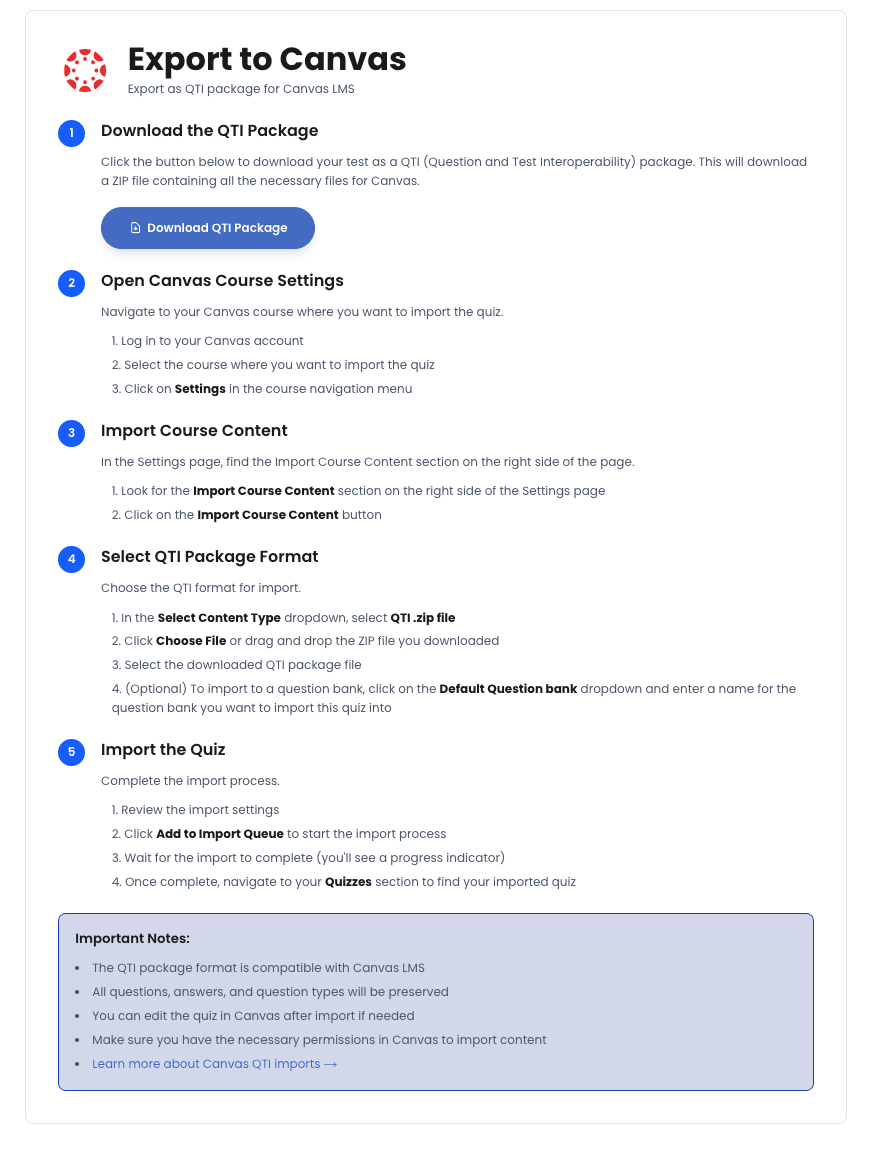
4. Follow the Canvas Export Flow
After selecting Canvas, follow the steps on the export page to generate your Canvas file.
Tips and Best Practices
- Use AI to generate a first draft, then refine—focus your time on question quality, not typing.
- Save tests to your question bank so you can export to Moodle, Blackboard, or Kahoot later.
- Canvas supports multiple choice, true/false, and short answer—all question types SimplTests exports.
Frequently Asked Questions
What is a QTI package?
QTI (Question and Test Interoperability) is a standard format for quiz content. Canvas and many other LMS platforms support it. SimplTests generates Canvas-compatible QTI so your questions import correctly.
Can I export to other platforms too?
Yes. The same test can be exported to Moodle, Blackboard, Kahoot, Google Forms, and Google Slides. One question bank, many platforms.
5. Ship Better Quizzes in Less Time
You just built, refined, and exported a classroom quiz with an online quiz maker in a fraction of the usual time. To make it even simpler, keep using AI to generate first drafts and spend your energy improving question quality instead of formatting.
Related Guides
Import Quiz Questions into Moodle with XML: A 3-Step Guide
Create tests with AI, export to Moodle XML, and import them into your Moodle course.
Import Quiz Questions into Blackboard Learn in 3 Steps
Create tests with AI, export to Blackboard-compatible TXT, and import them into Blackboard Learn.
Create a Google Form Quiz Automatically—No Copy-Paste Required
Create tests in SimplTests and export them directly to Google Forms—no copy-paste.