Published February 13, 2025 • SimplTests Blog • Kahoot • Classroom Games
From Quiz to Kahoot: Export XLSX and Run Live Classroom Games
Turn your SimplTests quiz into a Kahoot game. Export as XLSX, import into Kahoot, and run a live quiz with your class. Note: Kahoot supports multiple choice questions only.
Why Use Kahoot for Classroom Quizzes?
Kahoot turns quizzes into live games—students answer on their phones, see a leaderboard, and stay engaged. It's ideal for review sessions, icebreakers, or end-of-unit fun. Exporting from SimplTests as XLSX means you can generate questions with AI, then import them into Kahoot in minutes. No retyping, no manual formatting.
1. Create a Multiple Choice Test
Go to Create Test and build your quiz using multiple choice questions only—Kahoot doesn't support true/false or short answer. Use AI to generate them or add manually. Save your test to Saved Tests.
2. Export to Kahoot XLSX
Open your saved test, click Export, and choose Kahoot. SimplTests will generate an XLSX (Excel) file in Kahoot's spreadsheet format. Download it to your computer.
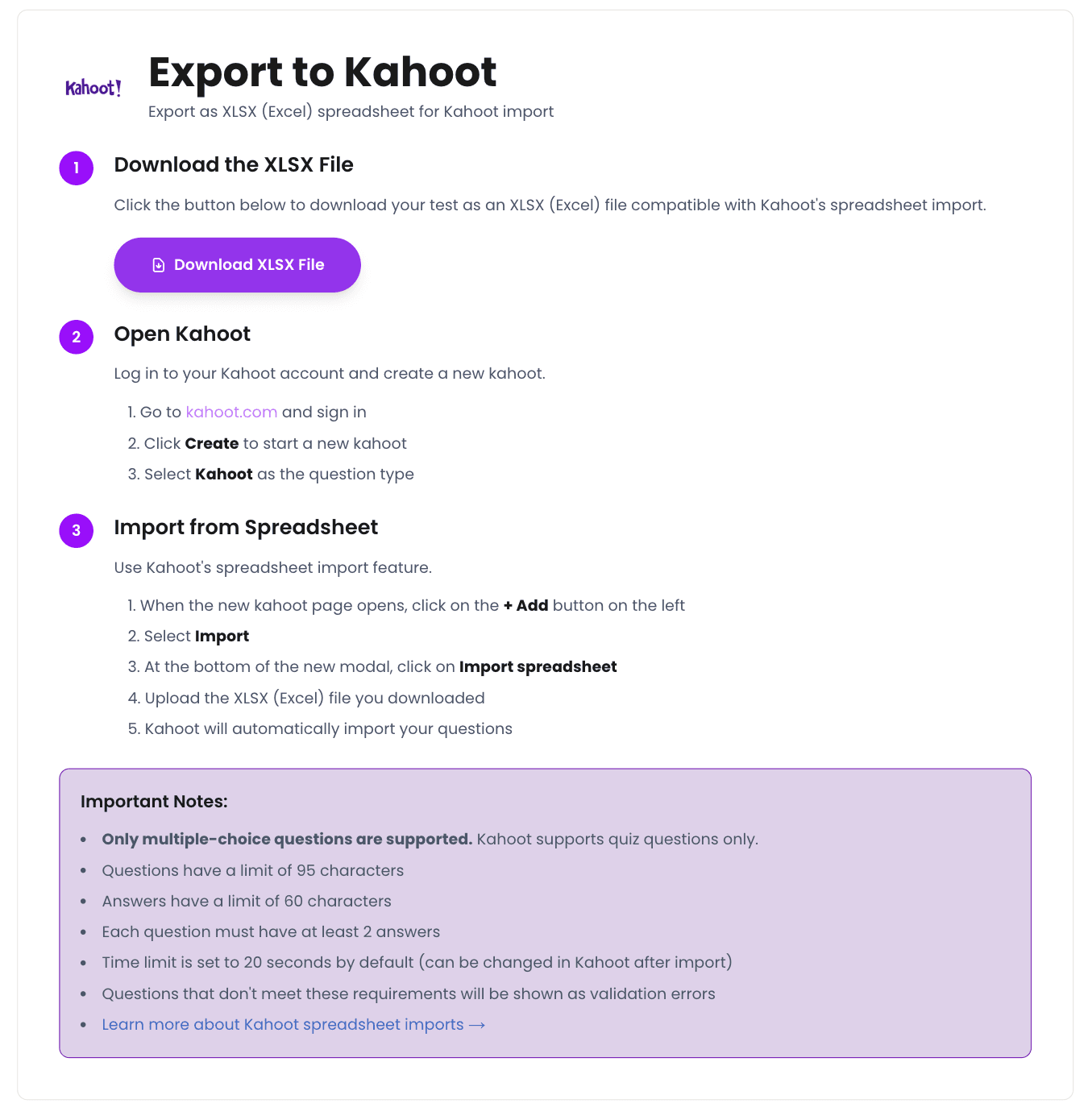
3. Import into Kahoot
Log in at kahoot.com, click Create, and select Kahoot as the question type. Click + Add → Import, then upload your XLSX file. Kahoot will add the questions to your new kahoot. Save and you're ready to host a live game.
- Go to kahoot.com and sign in.
- Click Create and select Kahoot as the question type.
- Click + Add → Import.
- Upload the XLSX file you downloaded from SimplTests.
- Save your kahoot—ready to play.
Tips and Best Practices
- Kahoot only supports multiple choice—ensure your SimplTests quiz uses MC questions only.
- Keep questions short; Kahoot displays them on screen for a limited time.
- Test your kahoot in preview mode before hosting a live game with students.
Frequently Asked Questions
Can I use true/false or short answer with Kahoot?
No. Kahoot's XLSX import format only supports multiple choice. Use our Google Forms or Canvas export for other question types.
How many questions can I import?
Kahoot supports up to 100 questions per game. SimplTests can export any number; split very long quizzes into multiple kahoots if needed.
Done
You've turned your SimplTests quiz into a Kahoot game. Generate multiple choice questions with AI, export to XLSX, import into Kahoot, and run it in class.
Related Guides
Create a Google Form Quiz Automatically—No Copy-Paste Required
Create tests in SimplTests and export them directly to Google Forms—no copy-paste.
Turn Your Quiz into a Google Slides Presentation in Minutes
Turn your SimplTests quiz into a Google Slides presentation—one question per slide.
One Question Bank, 6 Platforms: Export to Canvas, Moodle, Kahoot & More
Build one test manually, then export it to Canvas, Moodle, Blackboard, Kahoot, Google Forms, and more.